Kremi · Order & shipping automation
Designing an order pipeline that cannot fail silently
An order pipeline for the online store and three marketplaces that turns failure into an alert instead of a silent gap.
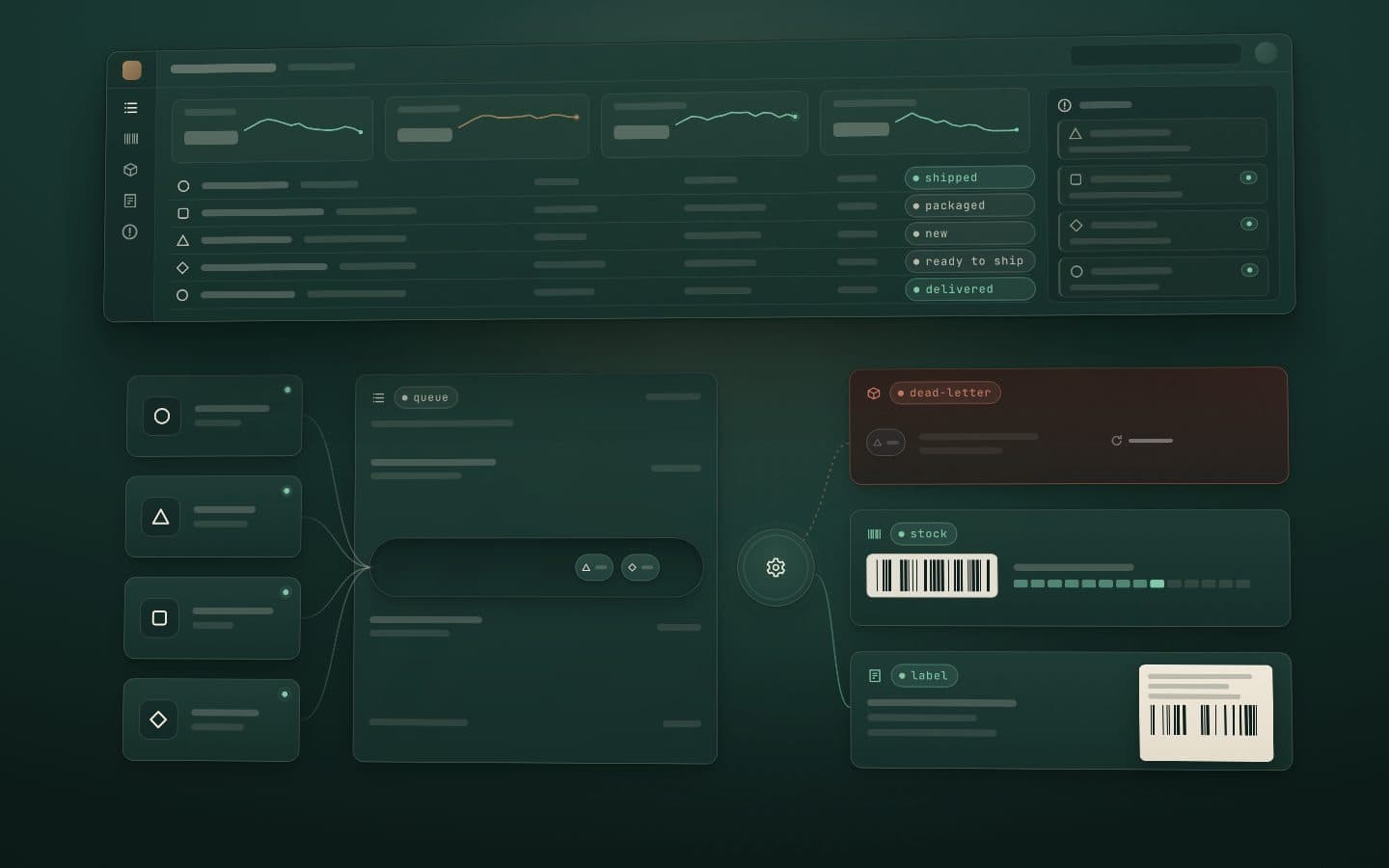
Problem
Kremi sells through its own online store and three marketplaces. Orders pass through store, marketplace and carrier APIs that can slow down or go dark at any time, and an order that fails there must never just disappear.
Constraint
You can't control when a third-party service degrades or goes dark, so the design has to assume it will.
Approach
I split the system into independent services. Resilience lives in the queue layer: failed jobs land in a dead-letter queue, get classified as retryable or permanent, retry a bounded number of times, then raise a human alert. Backpressure absorbs marketplace rate limits.
Result
A third-party outage costs time, not orders: failed work waits in a queue or reaches a person. The system runs in production and covers its failure paths with tests.
How the systems work
These systems are internal, so there are no real screens, data or figures here. Each one is drawn as an abstract scene that moves as you scroll: what we aimed for, what we built and how it turned out.
Nothing dropped silently01 / 03
Abstract scene: four source shapes send small tokens into one queue whose intake narrows under load. A worker turns them into done badges. One token turns amber and retries, runs out of retries, drops into a dead-letter bin and becomes an alert row in a skeleton panel.
01 / 03
Order pipeline
What we aimed for
A marketplace API that slows down or goes dark must never cost an order.
What we built
- Orders from all four sales channels, the online store and three marketplaces, become jobs in one queue, handled by a worker.
- Under marketplace rate limits the queue slows its intake instead of dropping work.
- A job that keeps failing is retried a bounded number of times, then parked in a dead-letter queue and raised as an alert.
Outcome
When a marketplace falters, orders wait or a person is told. They are never dropped, and the failure paths run under tests.
One order, one label02 / 03
Abstract scene: the same order sits on two screens. Printing on the first slides out a label and marks the order shipped; on the second, the same action meets a lock and no second label appears. A stack of orders then becomes a row of labels in one pass, and an hourglass fades the old labels.
02 / 03
Shipping and warehouse labels
What we aimed for
The warehouse needs to print barcodes and shipping labels one at a time or in bulk, without ever shipping an order twice or printing the wrong label.
What we built
- A carrier integration with single and bulk barcode and label printing for the warehouse.
- Safeguards for the moment one order is open on several screens at once, so it cannot lead to a double shipment or the wrong label.
- Each of those cases is covered by a test, and shipping labels are deleted after a set period.
Outcome
Warehouse staff can print single or bulk labels without the double-shipment and wrong-label risks of one order being open on two screens.
Locked before it leaves03 / 03
Abstract scene: a column of orders waits, ready to ship. A cancellation event travels from the store to one of them; it turns amber and locks, and sound arcs ring at the warehouse. The locked order moves to a refund queue, a manager summary tile appears and a note says the rollout is staged.
03 / 03
Cancellations and returns before dispatch
What we aimed for
When a customer cancels or asks for a refund after ordering, the parcel must not leave the warehouse by mistake, and the team should hear about it at once.
What we built
- When Shopify reports a cancellation or refund request, the warehouse gets an instant audible alert.
- The order is locked so the parcel cannot leave by mistake.
- A refund queue and a summary for managers follow.
Outcome
The warehouse hears about a cancellation the moment it happens, and a locked order cannot be shipped by mistake. It is being rolled out in stages.
One commerce backbone
Kremi's website, app and order systems work as one. Shopify sits in the middle: products, prices, stock and campaigns are set there once and reach both the website and the app, and every order, whichever channel it comes from, flows into the same order pipeline.
One store behind the website and the app
The website and the app run on one Shopify store, so products, prices, stock, translations and product details come from the same records. Homepage edits made in Shopify's theme editor reach the app's home screen without a new app release, and the app's menu, FAQ and legal pages come from Shopify too.
App orders are Shopify orders
Checkout in the app opens Shopify's own checkout, so an app order lands in the Shopify admin next to website orders and follows the same payment, notification and fulfillment rules. Every order keeps its sales channel, so app and website sales can still be reported separately.
Campaigns set once, in Shopify
Shopify works out the cart total and discounts, so the app shows the same total as the website. Discount codes, automatic discounts and gift-with-purchase campaigns set up in Shopify apply in the app with no extra development and no new app release. Product launches can open early for app users, with the date kept on the product in Shopify.
More on how it fits together (4)
One customer account
The website and the app share one Shopify customer account, with passwordless sign-in by email code. Saved addresses and favorites are the same on both, and the app's order history comes from that same account.
One order pipeline for every channel
Website, app and marketplace orders flow into one order pipeline, so an app order needs no process of its own. One physical stock is shared out across the sales channels, the website and the app sell from the same Shopify stock, and Shopify test orders never get a real shipping label.
Email
Order and shipping emails stay with Shopify: the shipping email goes out when tracking from the warehouse label flow is written back to the order in Shopify. Kremi's own review-request email goes only to customers with email-marketing consent in Shopify, checked at the moment of sending, and unsubscribing turns that consent off in Shopify too. Newsletter sign-ups from the app count only after the confirmation link in the email is clicked.
Push notifications, and no separate SMS
No separate SMS channel was built: shipping updates reach customers by Shopify email and, in the app, by push notification. Packed and shipped updates arrive once per order, and a notification opens the exact product, collection, order, cart or community post it is about.
Need something like this?
Send two or three lines: what you have, what is broken or missing, and when you need it. I reply within 12 hours, Monday to Saturday.